
Production Planning
See The Work.
Plan The Capacity.
Arrange operations across your machines and work centres, review what is ready and see where the plan needs attention. Bring job dates, material readiness and staff availability into the planning decision.
See The Planner In ActionExplore The Planning Board
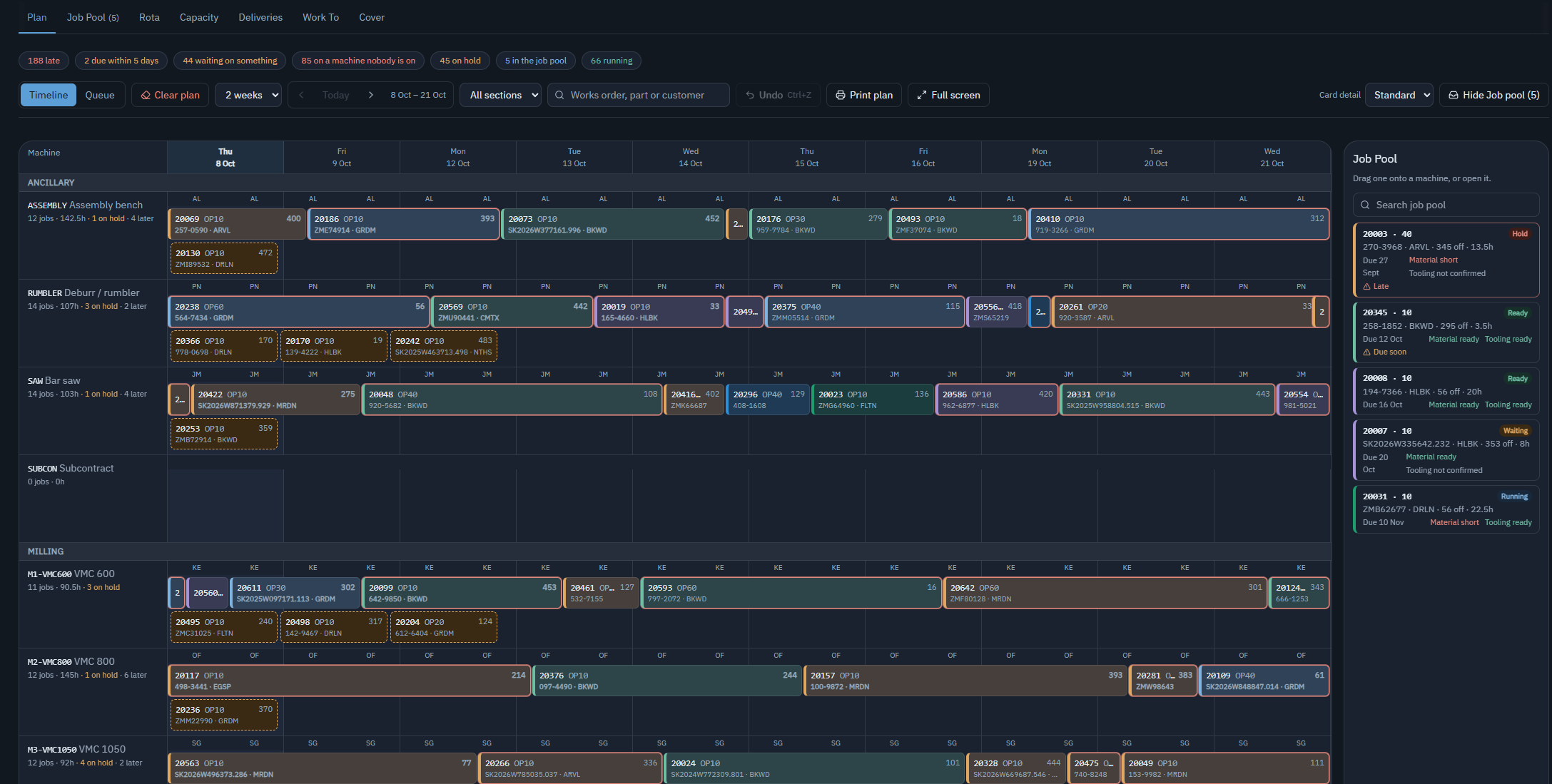
On the Board
Place The Work. Check Readiness. Review The Dates.
A shared plan shows where each operation sits and which jobs need a decision.
1 · Timeline
See What Is Planned On Each Machine
Review operations across the days ahead, grouped by machine or work centre. Use the timeline to see the sequence of work and find the job you need to review.
2 · Job Pool
Review Jobs Before Placing Them
The job pool keeps work visible beside the plan. Review a job’s date and readiness, then place it on a machine or open its record for more detail.
3 · Readiness
See What Needs Attention
Review late work, jobs on hold, material and tooling readiness, and machines without assigned staff. Open the relevant record to investigate before changing the plan.
Machines and People
Plan Against The Hours Available
Machine calendars and staff availability both matter. Review the rota, capacity and cover alongside the production plan.
Use Work-Centre Calendars
Plan against the working hours you have configured, rather than assuming every machine is available all day.
Account For Staff And Unattended Running
Review staff assignments, absences and double bookings. Unattended running is accounted for separately. Staffing warnings or restrictions follow your configured capacity policy.
Keep External Work Separate
Subcontract operations remain part of the job’s routing without inflating the hours loaded onto your own machines.
Switch to staffed capacity and the hours nobody is rostered are shaded out. CNC-01’s second operation still runs, because it is set to run unattended; the conflict on CNC-02 is two operations wanting the same machine at the same time. A simplified drawing, not a screenshot.
The agreed plan
Keep The Agreed Plan And See Where Work Is Slipping
Publish a production plan, follow confirmed progress against it, and review a forecast overrun before deciding anything. Falling behind does not move the plan.
Behind forecast finish 2h 40m past the published finish · next operation on CNC-01 affected
- The published bar stays where it is. Nothing is moved because a job is late.
- The forecast is drawn past it, hatched, and the following job is flagged as affected.
- Preview replan shows the proposed dates and everything downstream they touch.
- Apply replan is a deliberate planner action. It keeps the previous revision, who applied it and why.
A simplified drawing, not a screenshot.
What Progress Actually Means
An operation’s percentage is confirmed good quantity against that operation’s target. Scrap and rework are shown separately, and a machine’s own counter stays provisional until somebody confirms it, so the same parts are never counted twice.
A machine can be running and still be behind.
Unknown Is Not Green
Green means at or ahead of expected progress, amber behind it or forecast to overrun, and red when the published finish has passed. Where the data needed to judge progress is missing, the operation reads unknown rather than green. Published plans are switched on per site.
From Plan to Production
Keep The Plan Connected To The Job
Find The Record Behind The Card
Search by works order, part or customer. Open the job to review its operations and the records behind its status.
Review Material Before Scheduling
Material planning identifies what to make or buy and when. Use that information alongside the production plan to review whether the work is ready.
Follow Work On The Shop Floor
Operator bookings record time and quantities against the job. Review recorded progress when deciding what needs to move in the plan.
See It Working
Walk Through A Week Of Production
See how jobs, machine hours, staff assignments and material readiness come together in the planner. Machine planning on work-centre calendars, with drag-and-drop rescheduling and capacity warnings, is included in Core. Material requirements planning is included in Core. Staffing-aware planning is included in Factory and Connected Factory.