
Connected Factory
Machine Monitoring And OEE Software, Tied To The Job
See which machines are running, stopped or waiting, alongside the work assigned to them. Review output, cycle times and the source of the latest information in one view.
See Connected Factory In ActionExplore The Machine View
Machine Data and Job Records
Know What Is Running And What Needs Attention
Review The Machine State
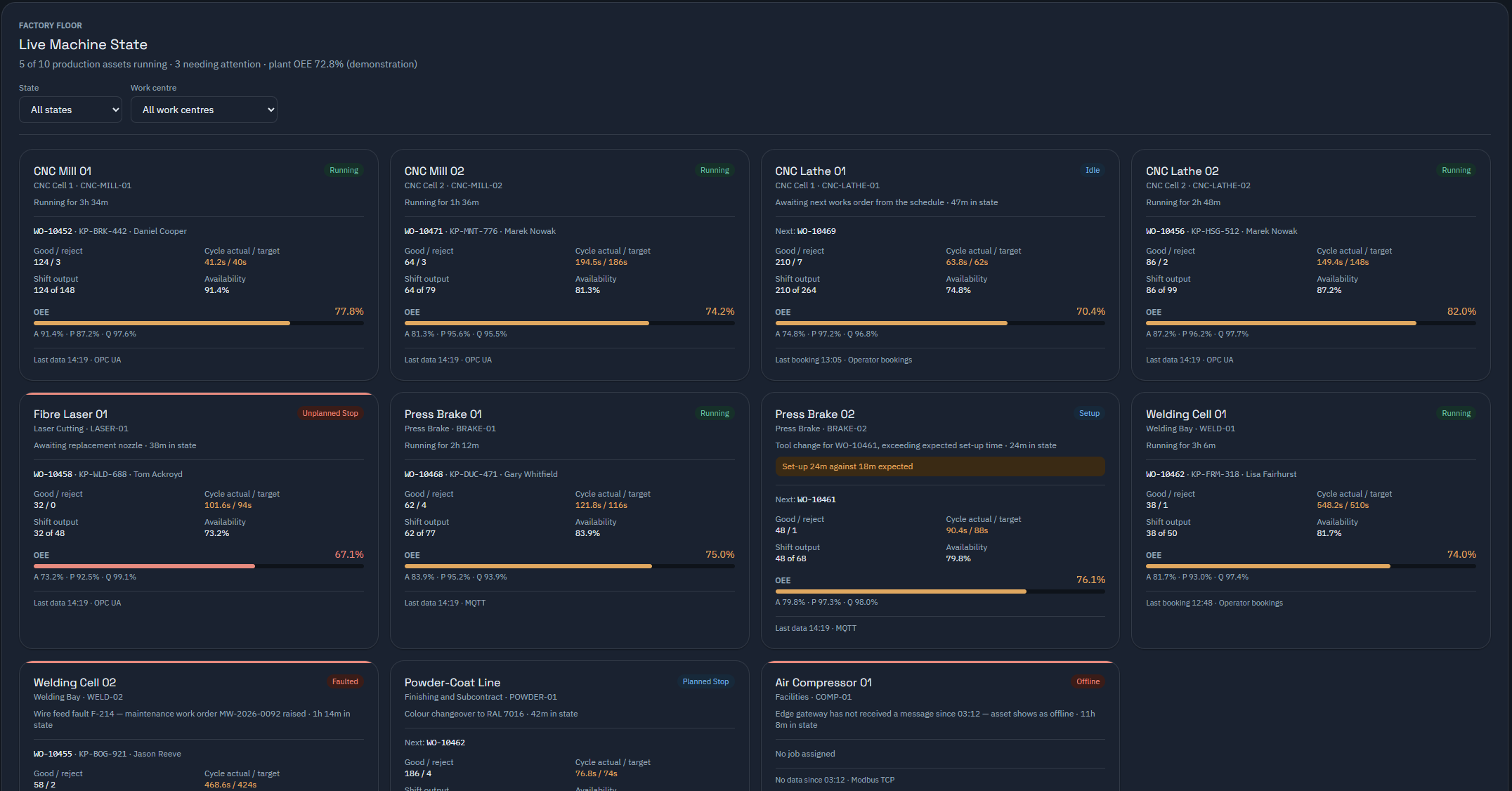
See running, setup, idle and stopped states. Open the associated works order to review the job affected and decide what to do next.
Check The Source And Freshness
Each card identifies machine readings or operator bookings, with the last update time. A machine that stops reporting needs investigation; missing data alone does not prove a mechanical fault.
Compare Output With The Job
Review good and rejected quantities, cycle times and shift output alongside the recorded job. OEE depends on the available state, production quantities, standards and bookings.
Read-Only Connectivity
Read The Machine. Keep Control With Your Team.
Keystone reads machine data. It never starts, stops or programmes a machine.
We assess your machines and controls before agreeing the collector configuration and installation scope. Available readings depend on the machine interface and the signals it provides.
Operator bookings can appear alongside connected machine readings. The source remains visible so your team can tell how each figure was recorded.
Link Readings To The Work
Review machine data with the works order running at the time, so a stoppage can be investigated in the context of the job and delivery commitment.
Review Utilisation And OEE
Use the recorded evidence to examine availability, performance and quality. Check the underlying quantities, timings and standards when assessing the result.
Follow Reporting Gaps
Keystone AI can flag a machine that stops reporting while a job is booked to it, identifying the affected order for review.
Shared Shop-Floor View
Show Current Work On A Wallboard
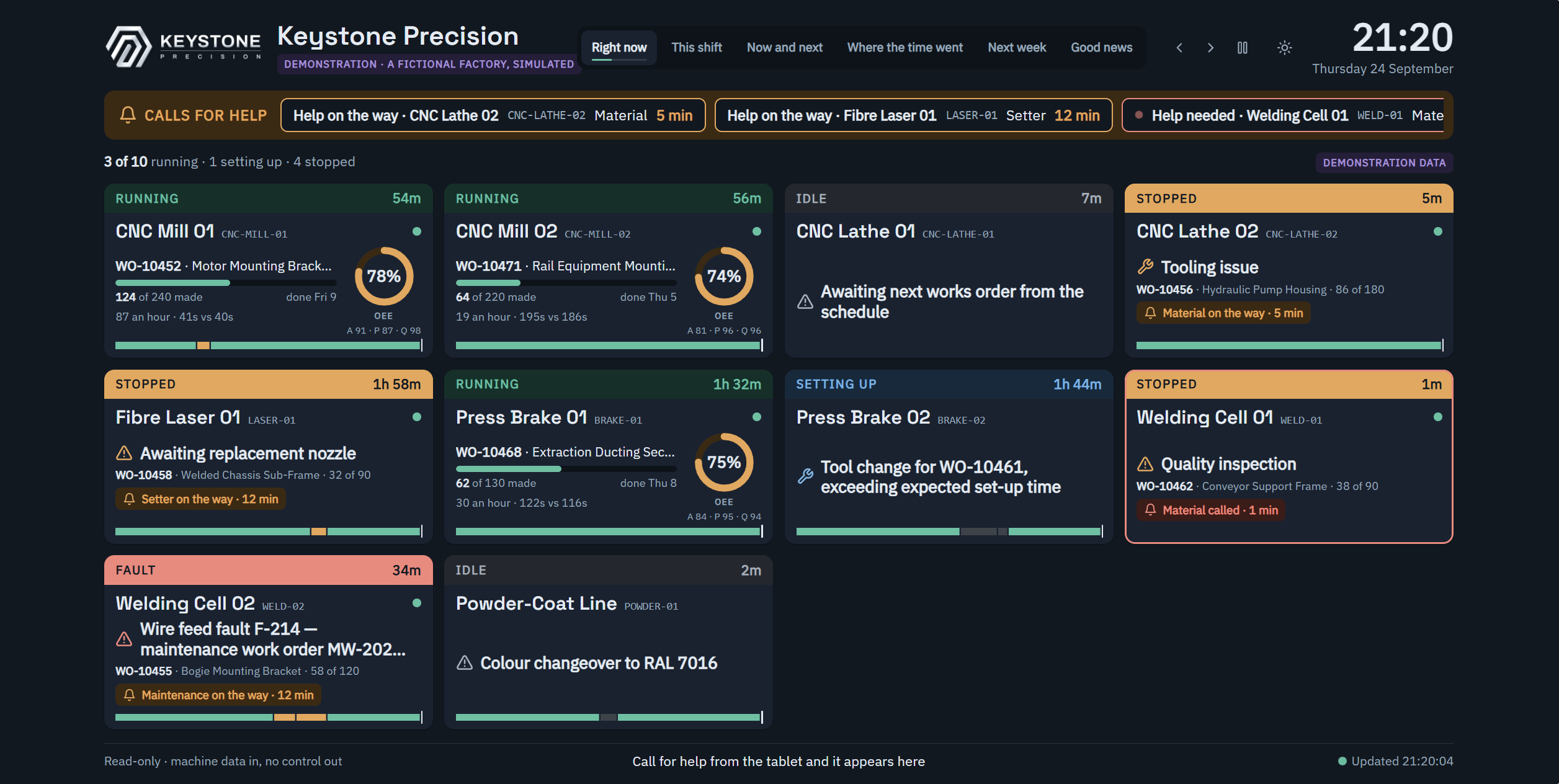
Give planners and supervisors a shared view of machine assignments, progress and the next job. Review recorded material and tooling readiness before moving the work forward.
What the collector reports
Machine State Beside The Job It Belongs To
Each reading is joined to the works order that was running, and carries the time it was taken. How old a reading is matters as much as what it says.
A simplified drawing, not a screenshot. A machine that has stopped reporting reads as no reading with the age of the last one, never as idle. Collection is read-only: nothing here starts, stops or reprogrammes a machine.
A Stoppage With The Job Attached
When a machine stops, the question is which order it hit. The reading is already joined to the works order that was running, so the stoppage can be investigated against the job and its delivery commitment rather than as an anonymous gap on a chart.
Freshness Is Part Of The Reading
Every reading carries its timestamp, and a machine that has gone quiet is reported as quiet. Keystone AI raises a finding when a connected machine has been silent for twelve hours while a job is booked to it. Stale data never counts as a healthy machine.
See It Working
Assess Your Machine Connectivity
Show us the machines and controls you use. We will review compatibility, available readings and the installation needed for Connected Factory.